
This section covers how an Administrator purchases Digital Key credentials for a customer in Dealer Admin. These steps should be completed after the compatible NFC multi-technology reader is installed.
To purchase and issue credentials in Dealer Admin, you need an Administrator role.
Enable Digital Key Credentials
To enable a pool of reusable Digital Key Credentials, complete the following steps:
-
Go to Customers.
-
Select the customer name.
-
At the top of Customer Summary, select Edit.
-
Scroll to the bottom of the page. Go to Digital Key Credentials and select the checkbox to enable the credentials.

Note: Digital Key credentials can only be enabled if Store User Codes is turned on. If Store User Codes is not enabled, a dialog box displays to enable the feature. Select Proceed to automatically enable Store User Codes for all systems.
-
Next to Number of credentials, use the plus + and minus - buttons to adjust the number of reusable credentials you want to enable. You can select credentials in increments of 5, ranging from 5 to 1,000 credentials.
-
In the Select which system to bill drop-down menu, select the system you wish to invoice the credentials to for a recurring monthly charge.
-
At the top of the page, select Save.
-
Notify your customer that you completed their purchase.
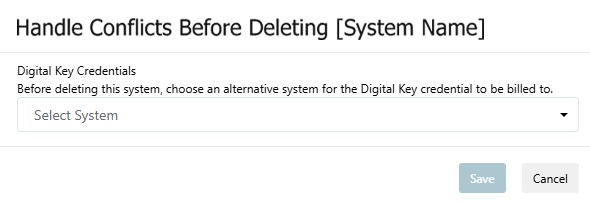
If you wish to delete a system that is set as the current billable system, you will be prompted to choose a new system to invoice the credentials to for a monthly charge. To choose a new billable system, complete the following steps:
-
Go to Customers.
-
Select the customer name.
-
In the row of the system that you want to delete, select the More icon.
-
Select Delete.
-
If the system is set as the current billable system, a dialog box displays to choose an alternative system for the Digital Key credentials to be billed to.
-
In Digital Key Credential, select the new system to invoice the monthly charge in the drop-down menu.
-
Select Save to delete the current system and set the new system to bill the credentials to.
Public Card Formats
|
CARD FORMAT |
WEIGAND CODE LENGTH |
SITE CODE POSITION |
SITE CODE LENGTH |
USER CODE POSITION |
USER CODE LENGTH |
USER CODE DIGITS |
|
DMP Wavelynx 40-Bit |
40 |
0 |
1 |
0 |
40 |
10 |